
General Settings
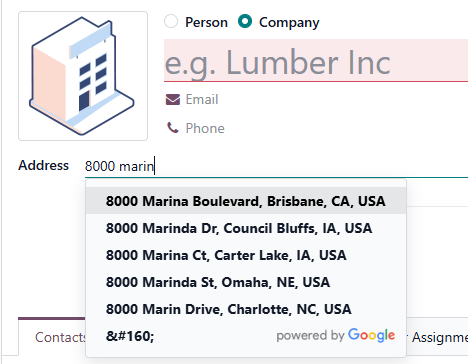
Autocomplete addresses as you type
What this does
Connects WindoorERP to the Google Places API so addresses complete themselves as they are typed — fewer keystrokes on a contact form, and fewer wrong site addresses reaching an installation crew.
Before you start
- You need a Google account and a Google Cloud project.
- The Places API is billable — check Google's pricing before you turn it on for a busy database.
Steps
WindoorERP integrates with the Google Places API to allow the autocompletion of addresses. As you begin typing an address, the system provides a list of suggested locations, reducing manual errors and saving time.
Important
Using the Google Places API could require payment to Google.
-
01
Open the Google Cloud console and sign in.
-
02
Click Select a project in the upper-left corner and create a new project (or pick an existing one).
-
03
From the navigation menu, go to APIs and services › Enabled APIs and services and click Enable APIs and services.
-
04
Search for Places API and select it — not Places API (New), which is not supported. Click Enable and complete the verification.
-
05
Go to APIs and services › Credentials, click Create credentials and choose API key.
-
06
Name the key, restrict it to the Places API under Select API restrictions, and click Create.
-
07
In WindoorERP, open Settings › Integrations, enable Google Address Autocomplete and click Save.
-
08
Return to Integrations, paste the API key in the field that has appeared, and save again.
Google Places API configuration
To use Google for address autocompletion, you must first enable the API and create the required credentials.
Enable the Google Places API
To enable the Google Places API, follow these steps:
- Go to the Google Cloud console.
- Create or sign in to a Google account.
- In the upper-left corner, click Select a project. Then, in the Select a resource pop-up, create a New Project.
Tip
If you have already created a project, but want to switch to a different one, click the selected project's name in the upper-left corner. Then, in the Select a resource pop-up, manually select a project. If the desired project is already selected by default, proceed to the next step.
- Open the (Navigation menu) side panel, then go to APIs and services › Enabled APIs and services.
- Click Enable APIs and services.
- Search for Places API and select it.
Important
Do not enable Places API (New), as it is not yet supported by WindoorERP.
- Click Enable.
- Complete the verification process.
Create API credentials
Once the project is created and the Places API is enabled, create API credentials. To do so, follow these steps:
- Open the (Navigation menu) side panel of the project, then go to APIs and services › Credentials.
- Click Create credentials , then select API key.
- In the Create API key panel, enter a Name.
- In the Select API restrictions dropdown, specify which APIs the key can access if there are several APIs configured in your project. Ensure Places API is selected, then click OK.
- Click Create.
Note
Under Application restrictions, the API key can be restricted to allow requests only from specific websites, IP addresses, or apps.
Important
Save your API key securely and never share it publicly.
WindoorERP configuration
Once the API key is generated, connect the WindoorERP database to the Google Places API. To do so:
- Go to the Settings app.
- Navigate to the Integrations section.
- Enable Google Address Autocomplete, then click Save.
- Return to the Integrations section, then paste your Google Places API key in the dedicated field.
- Click Save.
Common mistakes
- Enabling Places API (New). The integration only speaks to the classic Places API.
- Pasting the key before saving the setting — the field only appears after the option is enabled and saved.
- Leaving the key unrestricted. Restrict it to the Places API, and to your own sites or IP addresses, or anyone who finds it spends your quota.
- Sharing the key in a screenshot or a ticket. Treat it like a password.
Was this article helpful?
Thanks — your feedback helps.
Running a window or door factory?
Ask for a demo